Forget "AI strategy". For a team of one to twenty people, ChatGPT and tools like it are best treated as a fast, tireless assistant for the writing and admin around your work, one that's hopeless at being trusted without a check. Set it up properly once, learn one way of asking, and hand it five jobs you already do every week. This guide walks you through all of that, with prompts you can copy today.
What you'll have by the end
- A chat tool set up on the right plan, with training on your chats switched off
- One four-part way of asking that gets you usable first drafts
- Eight ready-to-use prompts for emails, quotes, summaries, tidy-ups and reviews
- A clear line on what customer information can go in, and what never does
- A one-week plan to turn it into a habit instead of a novelty
What it's good at, and what it isn't
ChatGPT is the best-known of a group of chat tools. The others you'll hear about are Claude, Microsoft Copilot and Google Gemini. You type a request in plain English and it writes a response: an email, a summary, a first draft, a list. It's genuinely good at language and structure, and it's quick.
What it is not is a source of truth. It predicts plausible text, which means it can state a wrong figure, date or rule with total confidence. So the one rule that makes everything below safe is simple: it drafts, you decide. Nothing it writes goes to a customer, a supplier or IRD without you reading it first.
Good at: first drafts
Emails, quotes, proposals, job ads and the awkward reply you've been avoiding. Editing a draft is far faster than writing one.
Good at: summarising
Long threads, supplier terms, council letters. Ask for the key points and "what do I need to do?" and read the source for anything that matters.
Good at: tidying
Jumbled lists, inconsistent exports and notes that should be a table. Reformatting is tedious for you and easy for it.
Not for: facts you haven't checked
Tax rules, prices, legal positions, dates. Treat every figure as a guess until you've checked it against the real source.
Set it up properly in 20 minutes
Most people sign up, get a so-so answer and decide it's overrated. Twenty minutes of setup changes that. Plan names and menus change often, so treat the labels below as the shape of it.
| Tool | Personal plans | Business plan | Business price, Oct 2026 |
|---|---|---|---|
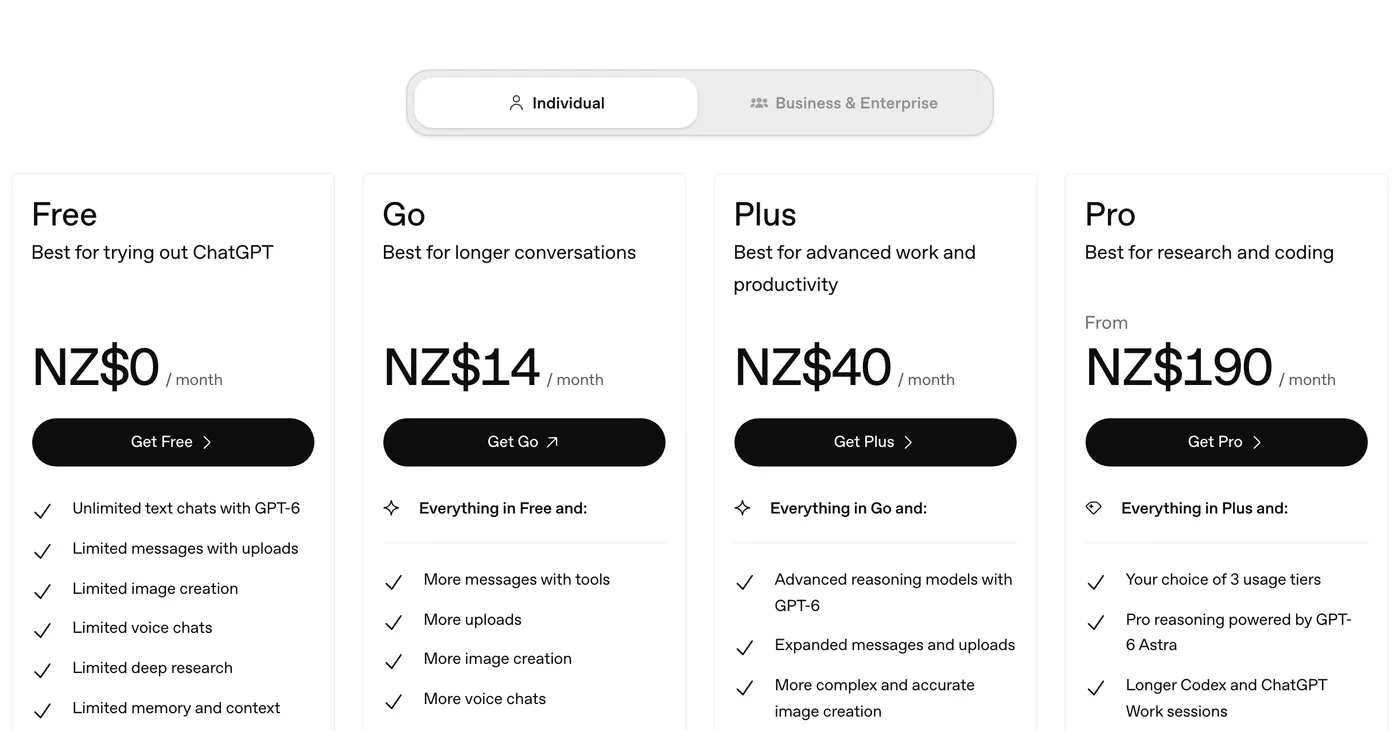
| ChatGPT | Free, Go, Plus, Pro: training is on until you switch it off | Business (formerly Team): no training by default | NZ$33 per user a month billed annually, or NZ$41 monthly, 2+ users1 |
| Claude | Free, Pro, Max: training is on until you switch it off | Team: no training by default | Standard seat $40 a month annually or $50 monthly, GST included3 |
| Microsoft Copilot | Consumer app: general questions only | Signed in with a Microsoft 365 work account: not used to train models | Copilot Business add-on NZ$34 per user a month ex tax, on top of a Microsoft 365 plan5 |
| Google Gemini | Consumer app: general questions only | Inside a Workspace business plan: not used for training outside your organisation without permission | Included in Workspace business plans, from NZ$10.50 per user a month (Starter)7 |
Already on Microsoft 365 or Google Workspace? Start with the tool that fits your plan: it's signed in with your work account and there's no new supplier to vet. Prices above are as each vendor's NZ pricing page showed them in October 2026, and some pages don't say whether GST is included, so check current pricing before you buy seats.
-
Pick one tool and one plan
If you'll paste in anything about real customers, staff or money, go straight to a business plan. Don't run two tools side by side in the first month.
5 minutes -
Check the training setting
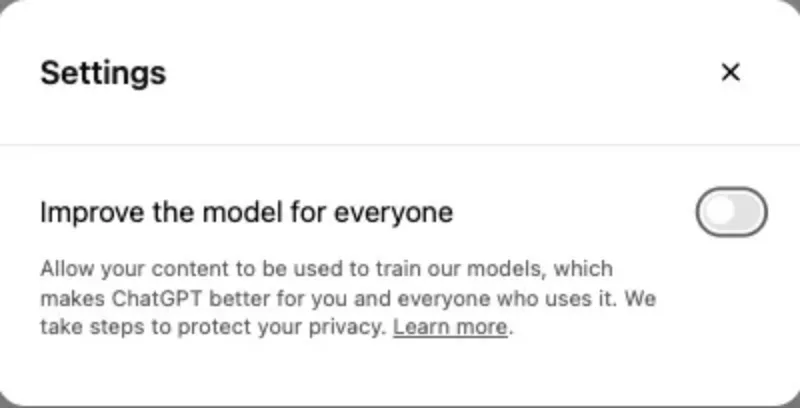
On a personal plan, switch off training yourself. In ChatGPT it's Settings, Data controls, Improve the model for everyone. In Claude it's Settings, Privacy, then the toggle for helping improve the models. On a business plan, training is off by default, but check the admin settings anyway. Write down where the setting lives so you can check it again later.
2 minutes -
Tell it who you are, once
Paste the "about my business" block below into the tool's standing instructions or a project, so you never explain yourself twice.
10 minutes -
Save your best prompts
Keep a note called "Prompts that work" and paste in every prompt that gave you a good result.
3 minutes
Standing instructions · about my business
The four-part prompt
Vague questions get vague answers. Give it what you'd give a new staff member on day one, in four parts:
- Who and what: the situation in one or two lines.
- The job: exactly what you want written or done.
- The details: the facts it must use, pasted in or listed.
- The shape: length, tone and format you want back.
How most people ask
- "Write an email about our price rise"
- Gets a stiff, generic letter
- Wrong tone, American spelling
- You rewrite most of it yourself
The four-part version
- Situation, job, facts and shape spelled out
- Gets a draft in your voice with your numbers
- NZ spelling from your standing instructions
- You change a line or two and send
The base recipe · use for anything
The last line does a lot of work. It stops the tool filling gaps with guesses. And when a draft is close, don't start again: reply "shorter" or "less formal" and let it revise.
Job 1: the emails you've been putting off
The price rise, the polite no, the complaint that deserves a careful answer. These are slow because the wording matters, not because they're long, which is exactly where a first draft helps.
-
Write the facts as bullet points
What happened, what you've decided, what you want them to do next. Leave out names and contact details; you'll add those at the end.
-
Paste the prompt below with your bullets
Say how you want them to feel after reading it: reassured, clear on the next step, not lectured.
-
Ask for two versions
One warmer, one firmer. Pick the closer one and tweak. Then add the name and send it from your own email.
Prompt · the awkward email
Example (illustrative): a 4-person landscaping firm in Whanganui. The owner had put off telling 60 maintenance clients about a rate rise for three weeks. She wrote five bullet points (new hourly rate, start date, the reason being fuel and green-waste fees, and that the current rate held for anything booked before the change) and used the prompt above.
She picked the warmer draft, cut one sentence and sent it that evening. The hard part was never the 150 words. It was starting.
Job 2: quotes and proposals from rough notes
The quote from today's site visit waits until the evening. Give the tool your notes and usual format, and you get a clean draft to check. It saves the writing, not the pricing judgement.
-
Save one good past quote as a pattern
Strip the customer's name and address from a quote you were happy with and keep it in a project or a note. That's your format.
-
Capture notes on the spot
Type or dictate the scope, materials and labour while you're still on site. Half-sentences are fine.
-
Run the prompt, then check every number
Compare each line to your rate card, then send it from your usual quoting tool so it's tracked.
Prompt · quote from notes
The tradies guide goes further, with a full worked version.
Job 3: summarise long documents
A 30-email thread, a supplier's new terms, a council letter. Ask for the key points and actions, then read the original for anything about money or obligations. A summary isn't legal advice; it tells you which paragraphs to read properly.
-
Check what's in it first
If the document has personal information about customers or staff, only use a business plan with training off, or remove the names first.
-
Ask for a summary with page references
Asking "where does it say that?" makes checking quick and catches the times it has filled a gap with a guess.
-
Read the flagged parts yourself
Price changes, notice periods, auto-renewals and liability clauses always get your own eyes.
Prompt · summarise and flag
Job 4: tidy messy lists and exports
The price list with five spellings of the same item, the export with phone numbers in three formats, meeting notes that should be a table. Boring for you, easy for it.
-
Start with a sample, not the whole file
Paste 20 rows and check the result before you trust it with 2,000.
-
Say what "clean" means
Which columns, what format for dates and phone numbers, what to do with duplicates and blanks.
Prompt · clean up a list
For the same idea running on its own, see the example on supplier price lists imported without retyping.
Job 5: reviews and short posts
Replying to every Google review, good and bad, is cheap marketing and one of the first jobs to slip. A draft in your voice turns ten minutes into a one-minute check. The same prompt works for a short post about a finished job.
You check it, add your number, and post it yourself.
-
Give it your voice once
Paste three past replies you liked and say "reply in this style".
-
Paste the review, without the reviewer's surname
First names are enough. Add one line on what actually happened.
-
Post it yourself
Never let a tool reply publicly without you seeing it first.
Prompt · review reply
If you wouldn't sign it with your own name, it isn't finished. The tool writes the draft; you write the last ten percent.The rule of thumb we use
What to be careful with
Free public chatbots may use what you type to improve future models, unless you switch that off. So the line is straightforward:
- General or made-up information is fine anywhere, including free plans. Practise here.
- Customer names, financials, contracts, anything personal only goes into a business plan with model training off, and never into a free public chatbot. New Zealand's Privacy Act applies to that data wherever it ends up.
Never paste these into any chat tool unless it's on your approved list:
- Passwords, bank details, IRD numbers or card numbers
- Health information about customers or staff
- A client's confidential documents, unless your agreement with them allows it
- Staff performance or disciplinary notes
And never send a figure, date or rule it gave you without checking it against the real source.
One catch on personal ChatGPT plans: if you give a thumbs up or down, OpenAI says that whole conversation may be used for training, even with the setting switched off.2
Two more habits worth building early:
- Know where the data lives. None of these four lists New Zealand as a data region. Some offer Australia on higher plans: ChatGPT for Enterprise customers, and Microsoft for in-country Copilot processing.26 For most teams that's fine, as long as the tool isn't using your information for its own purposes. The Privacy Act guide explains why that matters.
- Write down who uses what. Once a second person on the team starts using a chat tool, it's time for a one-page set of rules. Our AI usage policy guide covers what goes in it.
Start this week
Don't try all five jobs at once. Do this, in this order, and you'll have a habit by Friday:
- Monday: pick one tool and plan, and check the training setting
- Monday: paste the "about my business" block into the standing instructions
- Tuesday: use the awkward-email prompt on the one email you've been avoiding
- Wednesday: turn one set of site or meeting notes into a quote or summary
- Thursday: reply to your last five Google reviews with the review prompt
- Friday: save the prompts that worked to your "Prompts that work" note
- Friday: write down roughly how long each job took compared with doing it from scratch
The bigger wins aren't in the chat window
Drafting in a chat window is a real, immediate win, but the larger hours-back gains are usually in the workflow: the invoice that chases itself, the job that flows from your field app into Xero without being typed twice, the booking that fills itself. A lot of that is just connecting tools you already pay for. These pick up from here:
- Tradies: the first jobs worth automating
- Turn on automatic invoice reminders in Xero
- Examples of flows between ServiceM8, Fergus, Simpro, Cin7 and Xero
If you'd rather know which job to start with for your business, the free Readiness Check takes about 3 minutes and gives you a now, next, later plan.
Sources
- ChatGPT pricing, OpenAI (NZ$ prices as shown from New Zealand, 8 October 2026; the page doesn't say whether GST is included)
- Data controls FAQ, OpenAI Help Center; and data residency for Enterprise and Edu
- Claude pricing, Anthropic (checked 8 October 2026; the page says prices include 15% GST)
- How do I change my model improvement privacy settings?, Anthropic Privacy Center; and updates to consumer terms (28 August 2025)
- Microsoft 365 Copilot Business pricing, Microsoft NZ (checked 8 October 2026); and enterprise data protection in Copilot, Microsoft Learn
- In-country data processing for Microsoft 365 Copilot, Microsoft (4 November 2025)
- Google Workspace pricing, Google NZ (checked 8 October 2026); and generative AI in Google Workspace privacy hub